Zed Extension Badges
Live badges for Zed extensions, rendered per request from api.zed.dev.
The highlighted parts of each path are editable and every example on this page
follows along; click an edited value to reset it. Swap .svg for .png on any image endpoint when the target refuses SVG, Discord
included.
Extension badges
Drop an extension id in the URL and embed it anywhere. The card matches zed.dev's own extension list.


/extension/windows-batch.svg | card badge: Zed logo, name, download count, description, author line |
/extension/windows-batch.png | same badge as PNG |
/extension/windows-batch.json | raw Zed API metadata |
<id> is the id from the extension's extension.toml. Download charts
The same badge with the download trend attached below. Snapshots are taken daily, so a chart grows from the day an extension first appears in the index.
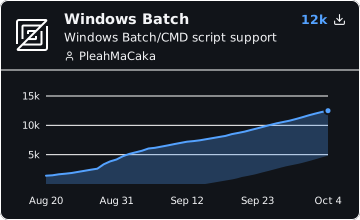
/chart/windows-batch.svg | badge card plus cumulative download trend |
Author badges
One badge for everything you published: total downloads and extension count.

/author/PleahMaCaka.svg | card badge: @name, total downloads, extension count |
/author/PleahMaCaka.json | raw stats: { name, extensions, downloads, ids } |
<name> matches the name part of authors in extension.toml, case insensitive (email ignored). Custom badges
Your text, same look. No upstream data involved.


/custom.svg?message=... | card badge with your own text |
/custom.svg?label=...&message=...&style=flat | thin variant, label left and message right |
right= (top right value), meta= (gray author line). Each text field caps at 48 chars. Query options
Options apply to every image endpoint unless noted.
style=flat | thin flat badge instead of the card |
theme=light | cream light card (default is dark, card only) |
label= | override the title (card) or left label (flat) |
desc= | replace the description with your own text; {{downloads}}, {{version}} (extension) and {{extensions}} (author) are substituted, and the first variable renders bold (max 48 chars) |
desc=0 / author=0 | hide the description or author line; the card recenters |
category=1 | show the extension category tag (Language, Theme, LSP, ...) |
metric=version | version instead of downloads (extension only) |
raw=1 | full count with commas (1,234) instead of 1.2k or 1.2M |
color= | flat badge value color (default Zed brand blue) |
labelColor= | flat badge label color, name or hex (default black; gray matches shields.io) |
logo=0 | remove the logo (flat only); the default downloads label becomes zed so the badge stays identifiable |
Freshness and errors
Badges render fresh on every request behind a short cache; end to end they
update within about 5 minutes. Unknown ID or name renders a red not found badge. Upstream outages render a grey unavailable badge (never cached). Your README never shows a
broken image.
